最近经常需要传输文件给别人,但是用微信或者网盘,速度都不敬人意,而且都是走一遍公网,然后再下到本地。可以的话,直接在局域网传输会快很多。
于是就在网上找到了这个工具。有着9.9k star的开源工具。
下载地址:
https://github.com/claudiodangelis/qrcp/releases
我这边主要在Windows下使用这个工具,所以简单介绍一下windows下的使用方法。
设置环境变量(可选)
设置成环境变量,之后就可以在任何地方打开cmd或者powershell执行,省去了寻址到二进制的文件地址然后执行的步骤。
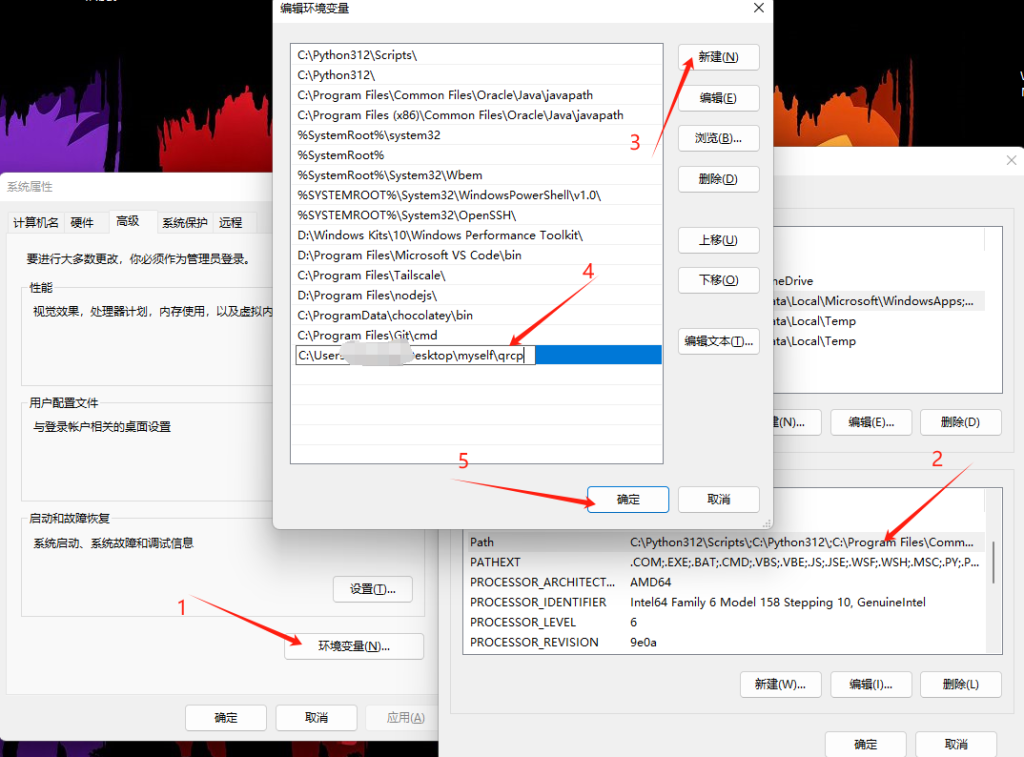
可以选择添加到系统,或者用户,取决与你的电脑使用用户以及是否需要让别的用户也可以使用这个工具与。
设置完成后就可以直接在cmd中执行qrcp。
QRCP配置
第一次使用qrcp时,若本地有多个网卡,那么就要选择绑定使用的网卡。
执行如下内容(小键盘方向键调整光标,回车选择):
qrcp config

C:\Users\XXXX>qrcp config
Use the arrow keys to navigate: ↓ ↑ → ←
? Choose interface:
> bgw (172.30.28.228)
FORDEVICE (192.168.31.200)
以太网 (192.168.10.200)
Loopback Pseudo-Interface 1 (127.0.0.1)
any (0.0.0.0)

Enter bind address (this will override the chosen interface address):<直接回车默认>
Choose port, 0 means random port:0
Choose fully-qualified domain name:<直接回车默认>

Use the arrow keys to navigate: ↓ ↑ → ←
? Should the server keep alive after transferring?:
> No
Yes

Use the arrow keys to navigate: ↓ ↑ → ←
? Should files be securely transferred with HTTPS?:
> No
Yes

Choose default output directory for received files, empty does not set a default:<直接回车默认>

Use the arrow keys to navigate: ↓ ↑ → ←
? Reverse QR code (black text on white background)?:
> No
Yes
选择合适的网卡,绑定的地址可以直接绑顶网卡地址,也可以自选同网段(不能使用已占用地址);
端口绑定默认选择random;
域名可以用随机也可以自定义无所谓的;
传输完成后是否保持服务器在线可以自行选择;
是否HTTP加密我一般选择不加密,反正是局域网传输;
选择默认保存文件的文件夹地址这个可以自己设置为常用的下载文件保存地址;
是否反相生成的二维码,可以选择默认;
总结下来配置只需要选好网卡,其他一路默认就行。如果有需要的可以自行调整。
QRCP命令参数
参数可以执行如下命令查看
qrcp -h

C:\Users\XXX>qrcp -h
Usage:
qrcp [flags]
qrcp [command]
Available Commands:
completion  Generate completion script
config      Configure qrcp
help        Help about any command
receive     Receive one or more files
send        Send a file(s) or directories from this host
version     Print version number and build information.
Flags:
--bind string           address to bind the web server to
-b, --browser               display the QR code in a browser window
-c, --config string         path to the config file, defaults to $XDG_CONFIG_HOME/qrcp/config.json
-d, --fqdn string
fully-qualified domain name to use for the resulting URLs
-h, --help                  help for qrcp
-i, --interface string      network interface to use for the server
-k, --keep-alive            keep server alive after transferring
-l, --list-all-interfaces   list all available interfaces when choosing the one to use
--path string           path to use. Defaults to a random string
-p, --port int              port to use for the server
-q, --quiet                 only print errors
-r, --reversed              Reverse QR code (black text on white background)
-s, --secure                use https connection
--tls-cert string       path to TLS certificate to use with HTTPS
--tls-key string        path to TLS private key to use with HTTPS
-z, --zip                   zip content before transferring
Use "qrcp [command] --help" for more information about a command.
QRCP使用案例
接收文件
C:\Users\XXX>qrcp receive
Scan the following URL with a QR reader to start the file transfer, press CTRL+C or "q" to
exit:
http://172.30.28.228:51540/receive/6l80
█████████████████████████████████████
█████████████████████████████████████
████ ▄▄▄▄▄ █ ██▀██▀█▄▀  ██ ▄▄▄▄▄ ████
████ █   █ █▀▀█▄▄▄█▀ ▀▄▄▄█ █   █ ████
████ █▄▄▄█ ██ █▀ ▄ ▄ ███▄█ █▄▄▄█ ████
████▄▄▄▄▄▄▄█ █ █ ▀ █▄▀▄█▄█▄▄▄▄▄▄▄████
████▄▀  █▄▄ █▄▄▄▄▄▄ ▀▀███▀ ▀▀▄█▄ ████
█████ ▀▄█ ▄ ▀██▀█▀ ▄█ ██▄ ▀▀ ▀▄▄▀████
████▀▄▄ ▄▀▄█▀▄█ ▀▀█▀▀ ██▀▄█▀ ▄▄▀▀████
█████▄▀▄ █▄▄ █ ▄▀▀▄█ ▀ ▀ ▄▄█▀▄▄ ▄████
████▄█ ▄ ▄▄▀▀▀▄  ▀█▄▄ ▄▄▄▄▀▄▄█▀ █████
████▄█▄▀ ▀▄▀█ ▄▀███ █▄▄▀█ ██ ▄ ██████
█████▄███▄▄█▀ ██  ▀  █ ▄ ▄▄▄   ▀▀████
████ ▄▄▄▄▄ █ ▀ ▀█▄█▄█▀▄▀ █▄█  █ █████
████ █   █ █▀▀█▄▀▀ ▀▀███▄▄   ▄▀██████
████ █▄▄▄█ █▄ ▀█ ▄▀▄▄ ▀ ▀▀ █ ▄█▀▄████
████▄▄▄▄▄▄▄█▄█▄█████▄▄▄██▄▄█▄█▄▄█████
█████████████████████████████████████
▀▀▀▀▀▀▀▀▀▀▀▀▀▀▀▀▀▀▀▀▀▀▀▀▀▀▀▀▀▀▀▀▀▀▀▀▀
可以让发送端扫描这个二维码,或者访问上面的链接选择文件或者文件夹进行发送,保持该进程不被杀掉就行
发送文件
C:\Users\XXX>qrcp send package.json
Scan the following URL with a QR reader to start the file transfer, press CTRL+C or "q" to
exit:
http://172.30.28.228:52595/send/d8r4
█████████████████████████████████████
█████████████████████████████████████
████ ▄▄▄▄▄ █▄ ▀█ ▀▀▄ ▄▀ ██ ▄▄▄▄▄ ████
████ █   █ █▄▀█▀▀█ ▄▄ ▀ ██ █   █ ████
████ █▄▄▄█ █▀▀█ ▄▄▄ ██▄ ▀█ █▄▄▄█ ████
████▄▄▄▄▄▄▄█▄█ █ █ ▀ █▄▀ █▄▄▄▄▄▄▄████
████ ▀▄█▀█▄ █▀▄▄   █▄▄ ▄██▀ ██▄▀ ████
████▀▄▀▀ ▄▄ ▀   ▀▀█▄▄▀▄ ▄▀▄▀▀▄▄█▄████
████▀▄ █▀▀▄█ ▄▄▄▀▄█▀ ██▄▄▄▄▄ █▀▀ ████
████▀▄█▀▀▄▄█ ▄  ▀▄ ▄ ▀█▀▀▀▄▄▄▄██▄████
████▄▄▀▀▄ ▄▄▄▄▄▀      █▀▄█▄▄█ ▀▀ ████
████▄▄███▄▄▀▄██ ▄▀██▄▀▄   ▄  ███▄████
████▄▄█▄▄█▄▄ ▄ ▀ ▄█ ▀ ▀▄ ▄▄▄  ▀▄▀████
████ ▄▄▄▄▄ █▄█ ▀▀▄ ▄▄ █▄ █▄█ ██▀ ████
████ █   █ ██ ▀  ▄ █  █▄ ▄ ▄ █▄█▄████
████ █▄▄▄█ █▄██▀▄▀▄▀ ▄▄  ▄ ▄█▄▄▄▄████
████▄▄▄▄▄▄▄█▄█▄▄██▄██▄█▄█████▄▄█▄████
█████████████████████████████████████
接收端只需要扫描二维码 或者访问上面给出的链接,就能执行下载。